Multicam auto-cut tool · macOS

Audio drives
the cut.

* no hand-syncing* no clip-by-clip razor

Powered by drop-driven multicam — RIM CHOP syncs your festival cameras and cuts hard on every drop, then hands you a switchable edit straight into DaVinci Resolve and Premiere Pro.

FREE TRIAL fully functional
FOUNDER RATE first 30 editors
RIM CHOP v22.0 · macOS only · shipping soon
Save your night for the edit, not the sync.

RIM CHOP frees you from hand-syncing and razoring multicam footage. Load the cameras, get a finished switchable edit cut to the music — and stay on the creative part.

3 simple steps

From footage to finished reel.

1

Load

Drop in every camera and a reference track — or pull straight from an open Resolve or Premiere project.

Resolve · Premiere · Disk
2

Chop

RIM CHOP syncs the cameras and cuts hard on every drop, with weighted roles and anti-repeat.

TC · LTC · Fingerprint · RAW
3

Deliver

Open a switchable multicam edit in Resolve or Premiere — re-pick any angle with ⌥ + a number.

FCPXML · XMEML · .prproj
Built for the drop

Not a sync tool. An edit.

Everything RIM CHOP builds stays editable — real multicam clips, real angles, ready to finish.

Switchable multicam

Angle per cut as a real multicam clip. Re-pick any shot with ⌥ + a number — no cut slips.

Writes a real .prproj

A finished Premiere project with a pre-picked angle per cut — no plugin required. The app runs on macOS; the project opens in Premiere on any OS.

Camera RAW sync

Blackmagic RAW and other professional camera RAW synced through the manufacturer SDKs — footage ffmpeg can't open.

Drop-driven cuts

Beat and energy detection place a hard cut on the drop with weighted camera roles.

Anti-repeat

Never the same camera twice in a row — the edit breathes like a human cut it.

Local captions

On-device Whisper captions with animated styles. No clips uploaded anywhere.

Auto-reframe

Five formats — 16:9 · 9:16 · 4:5 · 1:1 · 5:4 — grade-preserving.

Verified before render

Samples frames from each reel and catches a black or letterboxed reel before you export.

Edit preserved

Your cuts, zoom and shake stay intact — nothing is flattened or baked in.

Inside the app

The real workspace.

The actual RIM CHOP interface — six screens, one flow. Flip through Sync, Intake, Analyse, Cut, Recalibrate and Deliver.

Now viewing 01/06 SyncEvery camera on the grid — timecode + fingerprint
Scroll · drag · ← → to flip
RIM CHOPMulticam assistant · audio-drivenENTrial · 13 daysClear cache…?⟳ Refresh
‹ SyncResolve not connectedPremiere · 25 fps · 3840×2160
Files …from PremiereRELOAD▸ Play allMergeWaveform-ResyncRaster‹ Auto 4 ›EXPORT
0:0020:0040:001:00:00Σ 1:19:12
▸ ▪ ✕REFMain ▾0 f
REF_MAIN.MP4REF · 22:32:40:1448 kHz · 2 ch · 01:17:56 · pcm_s16be · File-TC 22:32:40:14
▸ ▪ ✕CAM 1Cam ▾0 f
FOH · A7S3.MP4TC +1904 f · File-TC48 kHz · 2 ch · 01:19:12 · pcm_s16be · File-TC 22:31:24:10
▸ ▪ ✕CAM 2Cam ▾0 f
C · 26 clips · 25.00pTC −3012 f · File-TC48 kHz · 2 ch · 01:15:53 · pcm_s16be · File-TC 22:34:41:01
▸ ▪ ✕CAM 3Cam ▾0 f
DJ · S2311.MP4TC −2607 f · File-TC48 kHz · 2 ch · 01:16:12 · pcm_s16be · File-TC 22:34:24:21
25 fpsHeightZoom100%Keep camera audio
25 fps · 4 tracks · 29 clips · 29 media · 4h 51m · 298.89 GBAuto → Timecode sync · Ref REF_MAIN.MP4 · 3 per TC · 0 without TC
RIM CHOPMulticam assistant · audio-drivenENTrial · 13 daysClear cache…?⟳ Refresh
‹ Music eventResolve not connectedPremiere · 25 fps
IntakeAnalyseCutRecalibrateDeliver
Media
Load pool from Premiere
Sync
Premiere: main_sync_tc
Load sync XML / AAF…Straighten sources…
Reference audio
Stereo split (L→A1, R→A2)
FOH · REF_MAIN.MP4
DJ · S2311.MP4
Camerasi
CameraWeightRoleAtmo
⌥1DJ · S2311.MP41.0DJ Frontal
⌥2FOH · A7S3.MP41.0FOH
⌥3C · 26 clips1.0
⌥4WIDE · D4207.MP41.0
At least 2 cams. Roles drive reframe, angle names + colour groups.
RIM CHOPMulticam assistant · audio-drivenENTrial · 13 daysClear cache…?⟳ Refresh
‹ Music eventResolve not connectedPremiere · 25 fps
IntakeAnalyseCutRecalibrateDeliver
Quick analysisDeep · +downbeats
BPM
157
Kicks
10,375
Drops
12
Length
1h 17m
Structure
HighLowDropBeat clicks▸ Play view
Drops
NormalNovelty
Number12
Lead-in (s)5.00
Check highlight gateClear ratings
Strongest drops
👍DROP 060:48:00▮▮▮▮
👍DROP 030:12:36▮▮▮▮
👎DROP 111:04:43▮▮▮▮
DROP 080:49:56▮▮▮▮
👎DROP 070:49:26▮▮▮
DROP 090:54:13▮▮▮
👍DROP 050:32:43▮▮▮
RIM CHOPMulticam assistant · audio-drivenENTrial · 13 daysClear cache…?⟳ Refresh
‹ Music eventResolve not connectedPremiere · 25 fps
IntakeAnalyseCutRecalibrateDeliver
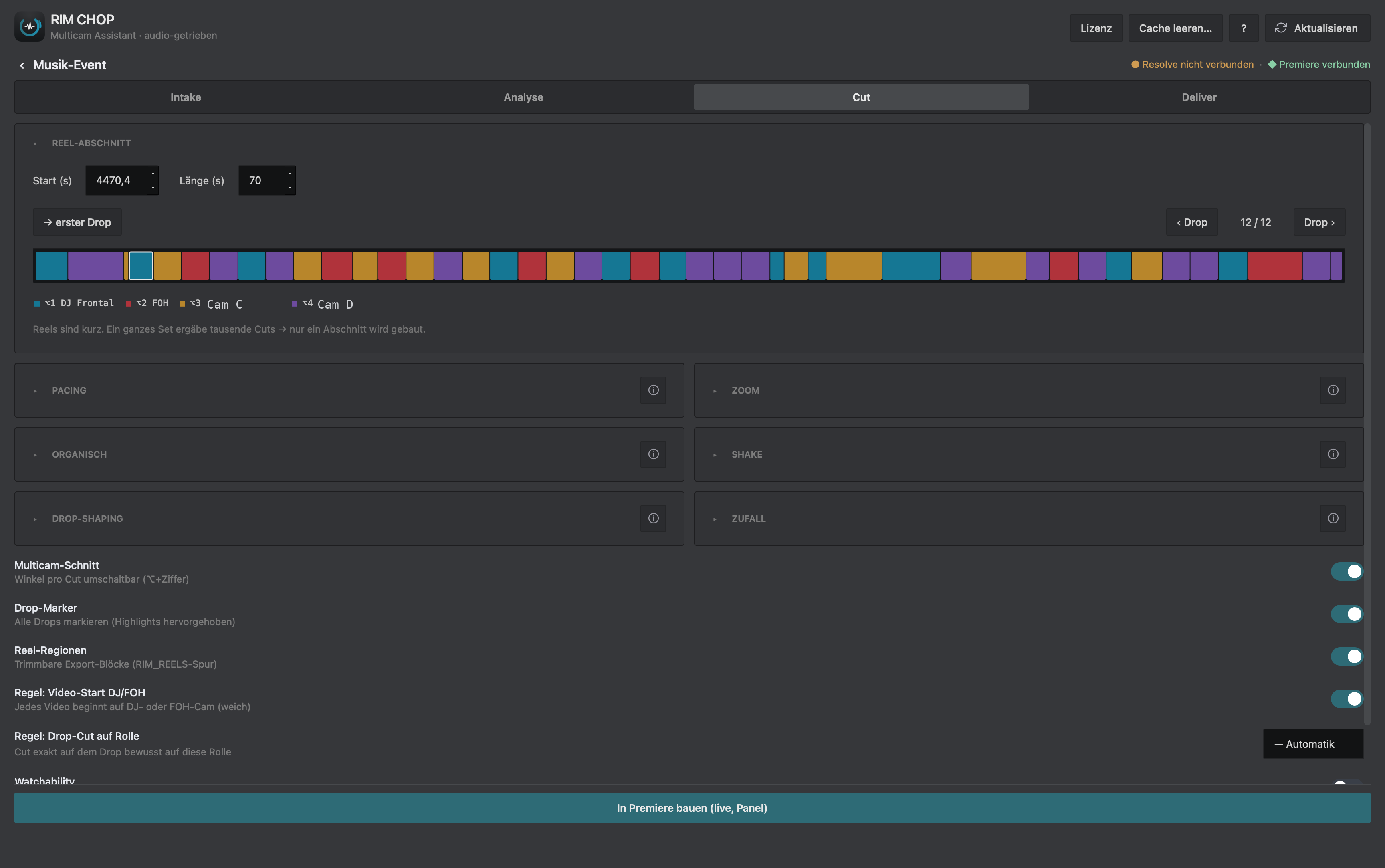
Reel section
Start (s)1958.9Length (s)600
→ first drop‹ Drop5 / 12Drop ›
⌥1 DJ Frontal⌥2 FOH⌥3 C · 26 clips⌥4 WIDE · D4207
Reels are short. A whole set would be thousands of cuts → only one section is built.
Pacing
Cut rhythm
Zoom
Push-in per cut
Shake
Camera wobble
Drop-shaping
Build / landing at the drop
Liveliness
Less mechanical
Random
Seed / variant
Randomi
Seed42↻ Variant
Multicam editDrop markers
Build in Premiere (live, panel)
RIM CHOPMulticam assistant · audio-drivenENTrial · 13 daysClear cache…?⟳ Refresh
‹ Music eventResolve not connectedPremiere · 25 fps
IntakeAnalyseCutRecalibrateDeliver
Zoom / shake — recalibratei
Tick a master on the right, “Check changes”, then recalibrate.
Create alongside instead of replacing the master
Check changes
⟳ Recalibrate zoom/shake
Master timelines
The masters built in Cut (RIM_CUT_drop*). Recalibrate acts on the checked master — reframes/reels follow in Deliver.
⟳ Load timelines
— not loaded yet —
RIM CHOPMulticam assistant · audio-drivenENTrial · 13 daysClear cache…?⟳ Refresh
‹ Music eventResolve not connectedPremiere · 25 fps
IntakeAnalyseCutRecalibrateDeliver
Aspect ratio
16:99:16 Reels4:5 Feed1:1 Square5:4
Multi-select — each chosen format is rendered separately.
Resolution4K · 2160×3840
Grade-preserving reframe
Export
FormatH.264
PresetH.264 · 40 Mbit MAX-Browse
FolderChoose export folder…Browse
Render reels
Final timelines
⟳ Load timelines
No sequences loaded — “Load timelines” fetches them from Premiere.
total formatH.264 codec40 Mbit MAX- qualityper preset target→ 2160×3840
RIM CHOP delivers to

Straight into your NLE.

DaVinci Resolve
FCPXML 1.9
Studio API or import
Adobe Premiere
.prproj · XMEML
Multicam, no plugin
Blackmagic RAW
via Blackmagic RAW SDK
Compatible · TC & audio
Pro camera RAW
via manufacturer SDK
Compatible · TC & audio
A tool for me.
A tool for you.
Built by a festival videographer

RIM CHOP comes out of cutting multicam for festivals, clubs and artists in the electronic-music world. Syncing a wall of cameras to the music and razoring every reel by hand ate whole nights, and the automatic tools out there either couldn't sync the RAW or wouldn't give back a real multicam edit you could still touch.

So RIM CHOP was built and run on real full-night shoots. It syncs the cameras, cuts hard on the drop, and hands back a switchable multicam project in Resolve or Premiere — the machine does the routine, you keep the creative part. If you cut festival footage too, it was built for you as much as for us.

RIMXYZ
Fair by design

Generous licensing.

20

Day full trial

Every feature, no limits — try it on a real set before you pay.

Free

Starter tier

Two cameras, watermarked — free to keep as long as you like.

Always current

Every update included — tuned for each new Resolve and Premiere release.

30

Founder seats

The first 30 editors get €99 their first year, for feedback.

6mo

Season option

A 6-month licence for the busy festival season. No auto-renew.

Local

Runs on your machine

Captions and analysis run on-device. Nothing uploaded.

Pricing

By year or by season. Founder rate to start.

A yearly plan, a 6-month season pass for festival season, or a free tier to try it first. The first 30 editors get €99 their first year.

Founder · first 30 editors€99 first year, then €179/yr. Everything in Yearly — your feedback shapes what ships next. Get founder access
Free
0
2 cams · watermark
  • 20-day full trial
  • 2 cameras, watermarked
  • no time limit
Start free
Recommended
Yearly
179
per year · ~50% off monthly
  • everything, all year
  • unlimited cameras
  • all updates included
Get early access
Season
89
6 months · no auto-renew
  • pay for the season you shoot
  • unlimited cameras
  • all features
Get early access

Also: Monthly €29/mo · prices planned for launch · local VAT at checkout

Questions

Good to know.

Do I need DaVinci Resolve Studio?
RIM CHOP delivers into DaVinci Resolve and Adobe Premiere Pro. For Resolve it can drive Resolve Studio directly, or hand off an FCPXML you import into any Resolve. For Premiere it writes a ready-to-open project — no plugin needed.
What sync methods are supported?
Embedded timecode and LTC for jam-synced rigs, plus audio-fingerprint sync when there's no shared timecode. RIM CHOP also reads Blackmagic RAW and other professional camera RAW through the manufacturer SDKs, so RAW that ffmpeg can't open still syncs cleanly.
Can I still edit after RIM CHOP builds the reel?
Yes — that's the point. You get a real, switchable multicam timeline. Re-pick any angle with ⌥ + a number, trim, grade and finish exactly like a project you cut yourself. Nothing is flattened.
What does it output?
FCPXML 1.9 for Resolve, FCP7 XMEML for Premiere's XML import, and a direct .prproj with multicam and a pre-selected angle per cut. Reels reframe to five formats — 16:9, 9:16, 4:5, 1:1 and 5:4.
Which platform?
RIM CHOP runs on macOS. Captions and analysis run locally on your machine — nothing is uploaded.
Is it available now?
RIM CHOP is in final pre-launch. Join the early-access list to lock in the founder rate and be first in when it ships.
Early access

Be first on the switch.

Leave your email — we'll send founder access the moment RIM CHOP ships. No spam, one message when it's live.

By submitting you agree we may email you once about launch. See our privacy notice. No spam.